UE5.3-5.8 editor plugin for environment art teams
Auto Asset Importer
Batch import structured FBX model folders into Unreal Engine with static mesh LOD grouping, configurable texture rules, material instance creation, presets, preview, and import reports.
Turn Repetitive Asset Setup Into A Predictable Import Pass
Built for production folders where every model arrives with FBX files, texture maps, material slots, and static mesh LODs that should become clean UE assets without hand rebuilding the same structure.
Manual Import
Before- Import each FBX and LOD file one by one.
- Create material instances for every material slot.
- Find and bind BaseColor, Normal, ORM, Opacity, and Emissive maps by hand.
- Fix missing textures only after discovering errors in the content browser.
- Repeat the same setup for every model folder.
Auto Asset Importer
After- Scan one-model-per-folder libraries with FBX and TEX subfolders.
- Preview meshes, texture groups, warnings, and import targets before committing.
- Import static mesh LOD groups into clean Unreal Engine asset names.
- Create material instances and bind textures from configurable naming rules.
- Generate a report that calls out missing maps and unsupported files.
A Four Step Import Workflow
The plugin keeps the process readable for artists: prepare the folders, scan the library, review the planned import, then let the tool build the Unreal assets.
Organize
Place each model in its own folder with dedicated FBX and TEX subfolders.
Preview
Review FBX files, static LOD groups, texture groups, warnings, and unsupported files.
Import
Import selected models or the whole scan result into a consistent UE content path.
Report
Check the final report for created assets, missing textures, warnings, and errors.
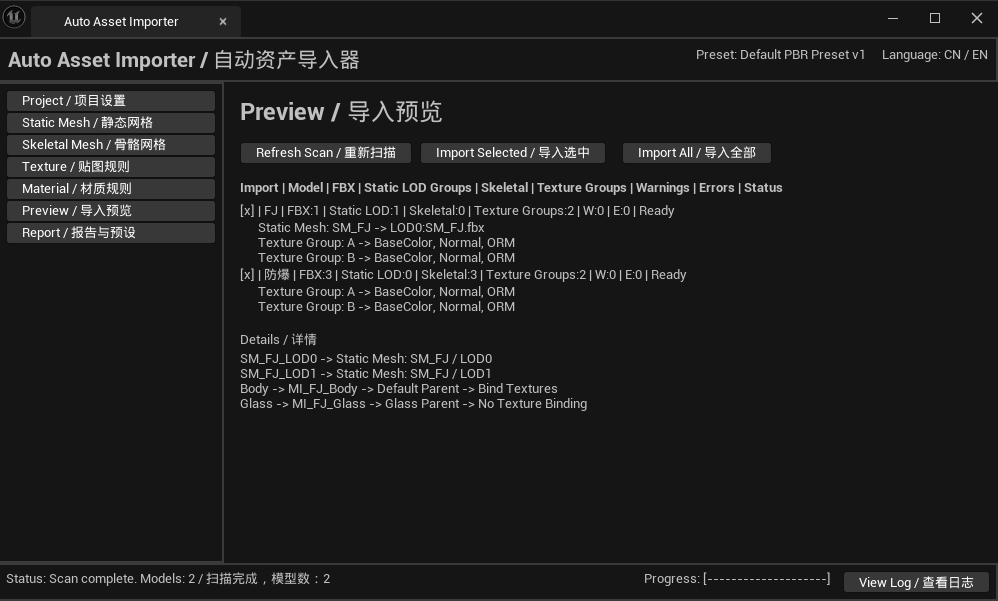
Real UE editor workflow
See What Will Be Imported Before It Touches Your Content Folder
Selective import
Scan a folder library, then import selected models instead of committing the whole batch.
Configurable naming
Set mesh prefixes, texture suffixes, ORM channel order, normal green channel handling, and material slot rules.
Production reports
Keep a readable report for missing ORM maps, unmatched texture groups, warning details, and created assets.
Folder and naming rules
Designed Around How Environment Assets Are Usually Delivered
Auto Asset Importer expects a clean art production structure and turns those naming rules into Unreal Engine assets, material instances, and report entries.
Rock_01/
  FBX/
    SM_Rock_01_LOD0.fbx
    SM_Rock_01_LOD1.fbx
  TEX/
    T_Rock_01_Body_BaseColor.png
    T_Rock_01_Body_Normal.png
    T_Rock_01_Body_ORM.png
    T_Rock_01_Glass_BaseColor.png
Built For Environment Art Import Workflows
The first commercial release focuses on making static mesh import reliable, inspectable, and easy to repeat across asset libraries.
Folder Based Scan
Scan one-model-per-folder libraries with fixed FBX and TEX subfolders.
Static Mesh LODs
Import LOD files as one static mesh asset with a clean Unreal Engine asset name.
Texture Rules
Configure suffixes for BaseColor, Normal, ORM, Opacity, Emissive, and custom naming styles.
Material Instances
Create material instances, bind texture parameters, and assign special parent materials by slot name.
Preview Before Import
Review models, texture groups, warnings, and unsupported files before committing the import.
Reports And Presets
Save import presets and generate clear reports for missing maps, warnings, and results.
Commercial license
One Purchase For Current UE5.3-5.8 Windows Builds
Auto Asset Importer is sold as a one-time purchase for one machine seat. The license is activated inside the Unreal Engine plugin and validated online before import.
If you need to move the license to another machine, contact support and include your order email.
Auto Asset Importer for UE5.3-5.8
One-time purchase, 1 seat, Windows builds for UE5.3-5.8.
- License key delivered after purchase.
- Online activation and import-time validation required.
- Includes UE5.3, UE5.4, UE5.5, UE5.6, UE5.7, and UE5.8 commercial builds.
- Refunded licenses are blocked before import after server validation.
Requirements And Scope
The first commercial version is focused on static mesh import automation for UE5.3-5.8 editor workflows.
FAQ
Does it import materials automatically?
It creates material instances from configured parent materials and binds matching texture parameters.
Can I configure naming rules?
Yes. Mesh prefixes, texture suffixes, ORM channel order, normal green channel, and material slot rules are configurable.
How does licensing work?
Each purchase provides a license key. The plugin activates online and validates the license before import.